
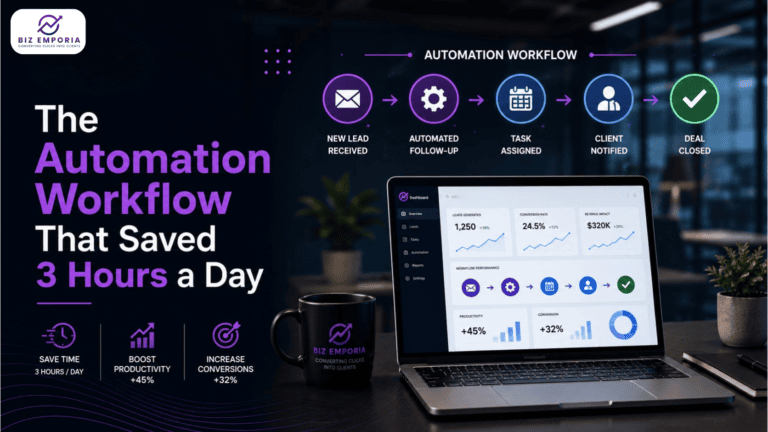
Three hours a day. That is what the team was spending on tasks that a properly built workflow now handles without anyone touching them. Not complex tasks. The opposite. Lead assignment. Follow-up reminders. Status updates. Notification emails. The kind of work that feels manageable until someone adds it up and realises a full-time employee is being paid a full-time salary to do things a CRM could do in seconds.
This is the workflow that changed that. Built once. Running since.
A marketing automation workflow is a set of trigger-based rules that takes care of repetitive business work automatically. Small businesses generally ignore building one as it doesn’t seem to be as important.
Most people hear “automation workflow” and picture something technical. It is not. At its core, it is just a set of rules: when this happens, do that. A form gets filled, a lead goes cold, a deal stage changes. The system handles what comes next without anyone having to remember to do it. The problem is that the urgent thing eating the afternoon is often the exact task the workflow would have handled in three seconds.
The barrier is almost never technical. Most CRMs used by small and mid-sized businesses already have automation capability sitting unused inside them. HubSpot, Pipedrive, ActiveCampaign, Zoho. The tools are not the gap. The gap is that nobody has sat down and mapped what a trigger-based process would actually look like for the specific work being done manually every day. That mapping took ninety minutes in this case. The three hours it recovered have been running on their own for eight months.
The three hours broke across five repetitive tasks, none of which required judgment to complete. Lead assignment, manual follow-ups, CRM updates, internal notifications, and weekly report compilation. Every task followed identical logic every time it was done. Every task was a candidate for automation from day one.
The three hours were not going toward anything strategic. One chunk went to manually sorting and assigning new leads to the right sales rep, a task that happened in batches whenever someone had a gap in their day, which meant leads sometimes sat uncontacted for hours. Another chunk was follow-up emails, written and sent individually to prospects who had not replied in three days or more. Then there was the CRM itself: updating deal stages after calls, which nobody did in real time and everybody did reluctantly. The last piece was internal notifications, someone manually flagging the right team member every time a contact hit a particular point in the pipeline. None of it required thinking. All of it required someone’s time.
Task | Time Per Day | Who Did It | Judgment Required |
Assigning inbound leads to reps | 35 minutes | Marketing coordinator | No |
Sending follow-up reminders manually | 55 minutes | Sales rep | No |
Updating deal stages post-call | 40 minutes | Sales rep | Minimal |
Internal notifications on stage changes | 25 minutes | Marketing coordinator | No |
Weekly lead status report compilation | 25 minutes | Marketing coordinator | No |
Total: 3 hours and 20 minutes. Every single day. On tasks with no decision-making inside them.
The question that should have been asked six months earlier: if a task follows the exact same logic every time it is done, why is a person doing it?
The workflow ran across five triggers inside the CRM. Each trigger fired a sequence of actions without any manual input. The logic was already implicit in how the team was doing the work manually. The automation made it explicit and removed the human in the middle.
The entire build took one afternoon.
The workflow begins by scoring every new lead against preset criteria. High-scoring leads are automatically routed to the next available rep and accompanied by a Slack notification containing the lead details. Lower-scoring leads move directly into a nurture sequence. The process removes the need for manual assignment and significantly reduces the time leads spend waiting for an initial response.
72 hours of silence and the workflow moves without anyone prompting it. A follow-up goes out from the rep’s address, short and to the point. No reply in another 48 hours, a second one sends. Still nothing, the contact is tagged cold and moves to a slower nurture track. The rep never had to think about any of it. Replies land in their inbox like they sent the email themselves, because as far as the prospect is concerned, they did.
Deal stage updates automatically. A post-meeting task gets created for the rep. If the meeting was a demo, a follow-up email with a relevant case study goes to the prospect within two hours. The rep gets a reminder at 24 hours if no next step has been logged.
Notification fires to the account lead immediately. If no movement on the deal within five business days, an internal alert goes to the sales manager. No deal goes quiet without someone knowing.
The CRM now sends a formatted report to the leadership Slack channel every Friday at 4 pm, covering lead sources, pipeline stages, and conversion rates. What used to take 25 minutes of manual work each week no longer requires anyone’s time.
The time recovered moved into work that actually needed people. Campaign work that had been deprioritised for months. Prospect conversations that previously went cold by default. The numbers that came back after the first sixty days were not close results. They were embarrassing ones, in the best way.
The coordinator who was spending 90 minutes a day on lead assignment and report compilation moved that time to campaign work that had been sitting in a backlog for months. The sales reps stopped dropping follow-ups because the system followed up for them. Response rates on the automated emails were within five percentage points of manually written ones. Nobody noticed the difference except the reps, who noticed they had time back.
Three things that surprised the team after the workflow went live:
Lead contact speed improved immediately. Before, leads sat unassigned for an average of 2.4 hours. After, the first contact happened within 11 minutes of a form fill. That single change moved the demo booking rate on inbound leads by 22 percent. Not because the message changed. Because the speed changed.
Follow-up consistency turned out to be more broken than anyone had realised. Before automation, 38 percent of leads received no follow-up after the first contact attempt. After, that number dropped to under 4 percent. Deals that previously went cold by default were now staying warm without anyone managing them.
The internal notification trigger stopped things falling through the gaps. Proposals that sat unanswered for a week used to go unnoticed until a pipeline review surfaced them. After the trigger was built, the sales manager was alerted at day five. Response time to stalled deals dropped from an average of nine days to two.
Start with tasks that someone on the team can describe without pausing to think. If the logic is identical every time and no judgment is involved, it belongs in a workflow, not on someone’s daily to-do list.
Have the team log their repetitive work for one week. The list that comes back will have the same shape it always does: three or four tasks eating most of the hours, all of them rule-based, all of them automatable. Start there.
A quick filter for deciding what to automate:
Tasks that fail all five of those filters are the ones that need human involvement. Everything else is a candidate.
The three hours the workflow replaced did not vanish. They moved. Into campaign work that had been sitting in a backlog for four months. Into conversations with prospects that previously went cold by default. Into strategy that had been deprioritised in favour of administrative work that felt urgent but was not important.
A marketing automation workflow built on the right triggers does not replace the team. It gives the team back the time they were spending on work the system should have been doing already.
If your business is spending hours on tasks that follow identical logic every time they run, BizEmporia builds automation workflows that recover that time and put it back into work that actually requires people. Book a consultation through the website and find out exactly where your process is losing hours it does not need to lose.
A single workflow covering one trigger and its downstream actions takes two to four hours to build, test, and deploy in most mainstream CRMs. A full set of five or six workflows covering the core sales and marketing process typically takes one focused week. The build is a one-off cost. The time recovered runs indefinitely.
No. Most modern CRMs use visual workflow editors built on if-this-then-that logic. The skill required is process clarity, knowing what should happen and when, not coding. The people best placed to build these are often the ones doing the manual tasks, because they already know the logic. They just need to put it in the tool.
Automating a broken process. If the manual task it replaces was being done inconsistently or based on unclear criteria, the automation will run consistently on the wrong logic. Define the process clearly before building the workflow. What triggers it, what the action is, what happens next. Written answers first, then build.
Send them from a named person's address, not a company alias. Keep them to two or three sentences. Write in first person. Reference something specific to the prospect's situation where the data allows. The automated follow-ups in this workflow had a 34 percent open rate. Manually sent emails from the same rep the week before averaged 31 percent. The automation did not hurt the relationship. The consistency improved it.
Hire when the work requires judgment, relationships, or creative thinking. Automate when it is repetitive, rule-based, and follows the same logic every time. The mistake is hiring people to do what automation should handle and then wondering why operational costs are high. Map the work first. Then decide whether it needs a person or a trigger.